Selecting an AI Tool

Posted on Jun 30, 2026

One of the easiest ways to start seeing immediate gains from AI is simply giving your employees access to the right tool.
You don’t always need a custom solution to get value from AI. Off the shelf tools have come a long way, and when your team has access to one that fits how they work, they can start learning, experimenting, and building their own workflows without waiting on a development project.
The question is which one is right for your organisation. Here is our assessment:
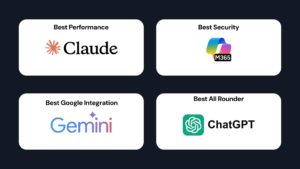
For most businesses, Claude is our top recommendation.
If you use the Claude for Teams subscription, Anthropic will NOT use your data to train their models.
It is the strongest performer across the widest range of tasks and has the best integrations available, meaning your team can connect it to the software systems they already use and start automating real workflows, not just having conversations.
Strengths:
Watch out for:
If your goal is to go beyond basic AI use and actually embed it into how your business operates, Claude gives you the most room to grow. Find out more about Claude Training.
For enterprise clients or those with strict data residency requirements, Copilot is often the natural choice.
It sits directly inside the Microsoft 365 environment your team already works in, and for organisations that need their data to stay in Australia, Microsoft offers local data residency, which is a hard requirement for many of our larger clients.
If security, compliance, and Office 365 integration are priorities, Copilot is the right fit.
Strengths:
Watch out for:
For large enterprises and government departments, M365 Copilot’s data security normally makes it the obvious choice. Find out more about Copilot Training.
If your business already runs on Google Workspace, Gemini is worth serious consideration.
It integrates closely with Gmail, Drive, Docs, and Sheets, making it a natural fit without additional setup.
The best AI tool is often the one that slots into your existing environment with the least friction.
Strengths:
Watch out for:
If Google Workspace is the backbone of how your team operates, Gemini is the path of least resistance.
For smaller businesses already familiar with ChatGPT and conscious of cost, it remains a solid starting point.
It is accessible, well known, and easy to get your team using quickly.
Strengths:
Watch out for:
For getting a team comfortable with AI quickly and cheaply, ChatGPT is a reliable entry point. Find out more about ChatGPT training.
If you’re considering AI but aren’t sure where to begin, get in touch.